VoxFlow Pro for Mac
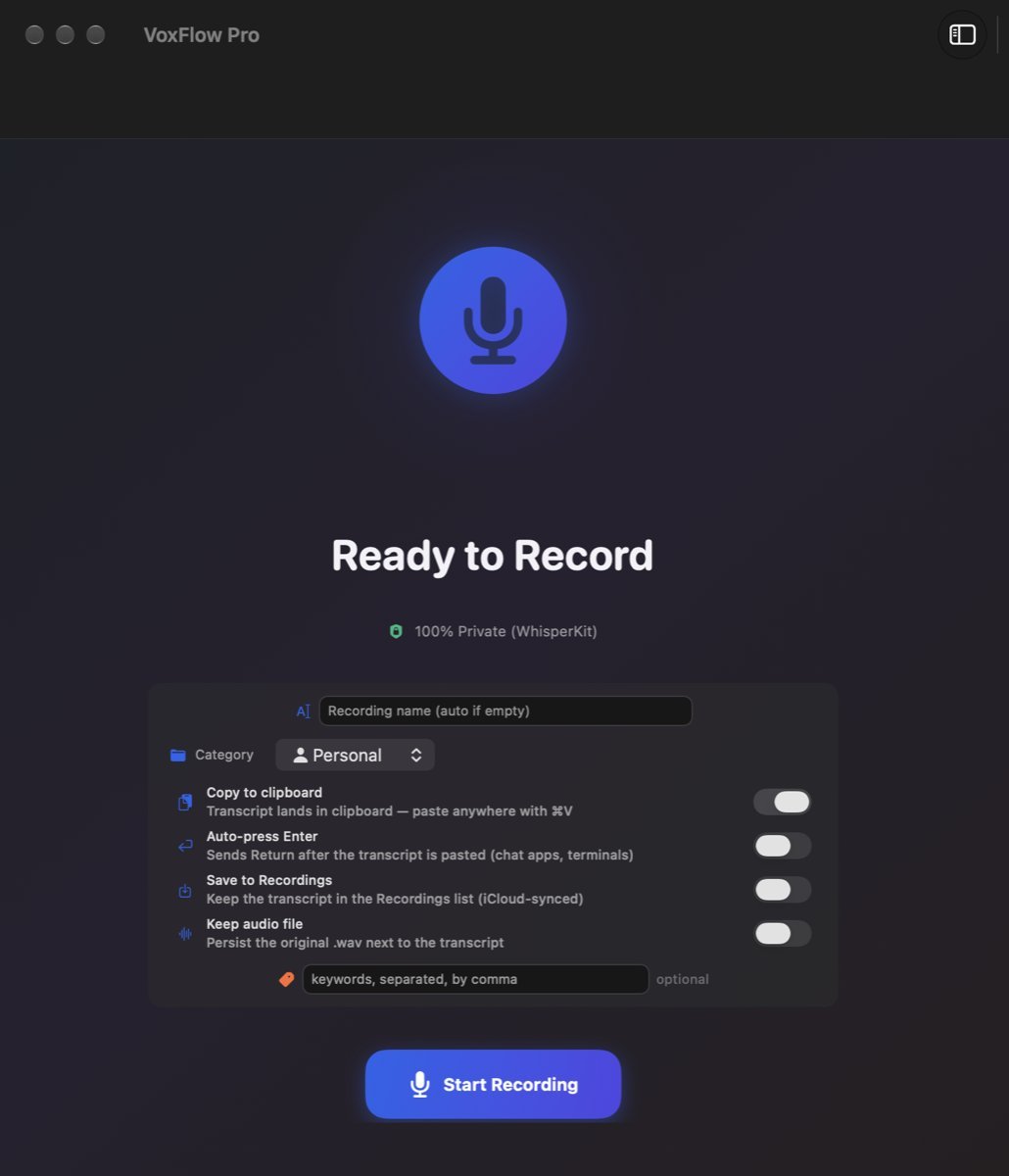
Hold a key, say the sentence, let go. The text appears in whatever app you were already typing in. Everything is transcribed on your own Mac.
Download VoxFlow Pro for Mac (1.9 MB) ↓Free. Version 1.0, macOS 14.0 Sonoma or later, Apple Silicon and Intel. Notarized by Apple. No account, no subscription, no trial timer.
- Free
- No account
- Runs on-device
- Works offline after first launch
- Push-to-talk into any app
- Notarized by Apple
Why this is a direct download and not an App Store app
VoxFlow on the App Store is the iPhone, iPad and Apple Watch app. It has no Mac build: the App Store listing reports 130 supported devices and none of them is a Mac. Rather than pretend otherwise, we ship the Mac app the way a Mac app was shipped for twenty years before the Mac App Store existed, as a signed disk image you download from the vendor.
That has one consequence worth stating up front: nobody reviews it for you. So here is what you can check yourself before you run it.
Verify it before you run it
After downloading, compare the checksum in Terminal:
shasum -a 256 ~/Downloads/VoxFlow-1.0.dmg
It must print exactly:
0abd7dde30fe2dc592e6f114592aa553b8c6a3ba177f84cd70850e27442ba8da
Once the app is in your Applications folder you can ask macOS itself what it thinks of it:
spctl -a -vvv -t exec /Applications/VoxFlow.app
The answer should be accepted, source=Notarized Developer ID, origin=Developer ID Application: BIT Technology s.r.o. (T3BMR868R2). Because it is notarized, it opens with a normal double click. You do not need the right-click Open workaround, and you should be suspicious of any Mac download that asks you to disable Gatekeeper.
What you get
| Push-to-talk | Hold Globe, Caps Lock or the right Shift key, speak, release. Text goes into the focused app. Each trigger is toggleable in Settings. |
|---|---|
| On-device transcription | WhisperKit runs the model locally on your Mac. No VoxFlow server is involved, so after the one-time speech model download on first launch it also works on a plane or with Wi-Fi off. |
| iCloud sync (optional) | Notes sync through your own iCloud account with the iPhone and Apple Watch app. Your data, your Apple ID, no VoxFlow account. |
| Universal binary | x86_64 and arm64 in one app, so it runs natively on both Intel and Apple Silicon Macs. |
| Permissions | Microphone to record. Accessibility to notice the push-to-talk key. Nothing else. |
What it is not
- Not on the Mac App Store. This page is the only place it is distributed.
- No auto-update. Version 1.0 has no updater built in. New builds get published here and you replace the app yourself.
- Not a meeting recorder or a transcription service. There is no minute quota because there is no server counting minutes, but there is also no dashboard, no team workspace and no web app.
- Not a rewrite of your text. It writes down what you said, in the app you are already in.
The 60 second version
- Download the disk image, drag VoxFlow to Applications, open it.
- Grant Microphone when asked, then Accessibility in System Settings so it can see the push-to-talk key.
- Put the cursor in any app. Hold your trigger key, say a sentence, release.
Also on iPhone and Apple Watch
The same notes, captured from the wrist or the phone, are a free App Store download. That version is separate from this one and it is the one Apple reviews.
Get VoxFlow on the App Store →iPhone, iPad and Apple Watch. Free, no account, no cloud.
Questions
Is VoxFlow Pro for Mac on the Mac App Store?
No. It is a notarized direct download from this page. The App Store listing for VoxFlow covers iPhone, iPad and Apple Watch only, so if you search the Mac App Store you will not find it.
Is a direct download safe to open on macOS?
The app is signed with a Developer ID certificate issued to BIT Technology s.r.o. and notarized by Apple, so Gatekeeper accepts it and it opens with a normal double click. You can verify it yourself with spctl -a -vvv -t exec /Applications/VoxFlow.app, which reports source=Notarized Developer ID.
Does my audio leave the Mac?
No. Transcription runs locally through WhisperKit on your Mac. There is no VoxFlow backend to upload recordings to. This is a description of how the app works, not a legal or compliance claim.
What does push-to-talk do?
You hold a key, speak, release, and the text lands in whatever app has focus. Three triggers ship in the app: the Globe key, Caps Lock and the right Shift key, each toggleable in Settings. It needs macOS Accessibility permission to watch for those specific keys.
Does VoxFlow Pro for Mac update itself?
No. Version 1.0 has no auto-update mechanism built in, so new builds are published on this page and you download and replace the app yourself.
What does it cost?
Nothing. The download is free, there is no account, no trial timer and no subscription. If it saves you time there is a voluntary support button at the bottom of this page, and it changes nothing about the app.
Download
Download VoxFlow Pro for Mac (1.9 MB) ↓VoxFlow-1.0.dmg, 1 986 338 bytes, SHA-256 0abd7dde30fe2dc592e6f114592aa553b8c6a3ba177f84cd70850e27442ba8da
Support the project
VoxFlow Pro for Mac is free and stays free. No account, no trial timer, no subscription, no upsell inside the app. If it saves you time, you can send a one-off thank you. It pays for the Apple Developer account and the next build.
PayPal handles the payment. Nothing is loaded from PayPal and no cookie is set until you press the button. You get no licence and no extra features for it, the app is the same either way.