BeMooore › VoxFlow › Mac › Spokenly alternative
A Spokenly alternative for Mac: smaller, simpler, also free
Spokenly is one of the best free dictation apps for Mac: local Whisper and Parakeet models, no word cap, offline use, and optional cloud engines and AI cleanup for those who want them. We will not pretend VoxFlow beats it on features. VoxFlow Pro for Mac is for people who want the opposite: one small app, one key, no models to pick, no API keys, no plans. Here is an honest look at when each one fits.
Get VoxFlow Pro for Mac, free →macOS 14 Sonoma or later, Apple Silicon and Intel. Notarized by Apple. No account, no word limit, no subscription.
The short answer
- Keep Spokenly if you want a choice of models, AI cleanup, real-time streaming, history with audio replay, or the same app on Windows, Linux and iPhone. It does much more than VoxFlow, and its free plan is generous.
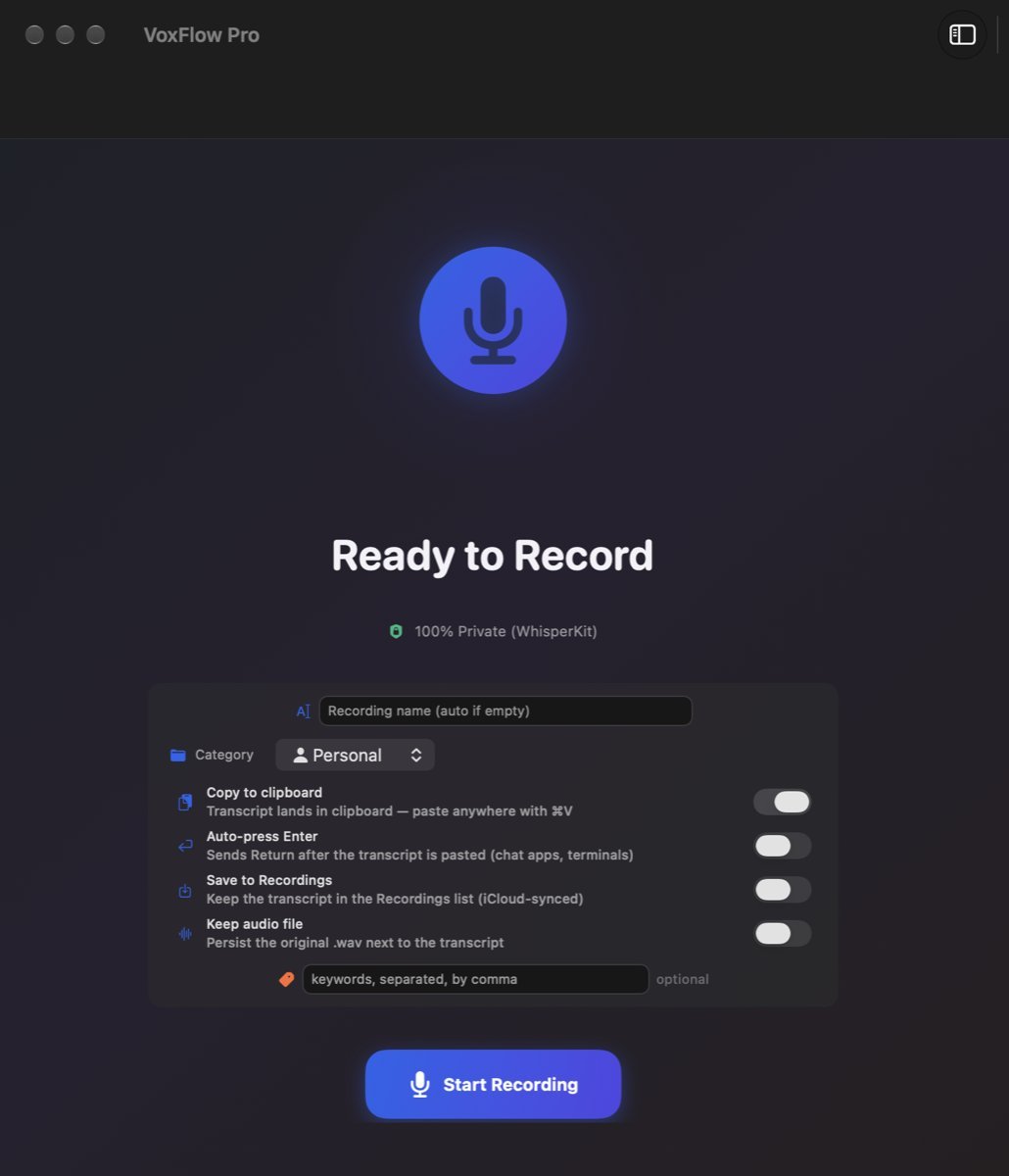
- Try VoxFlow Pro for Mac if you want a 1.9 MB app with nothing to configure and no upgrade offers, that only ever runs on your Mac and types what you said, word for word.
- Use both if you like. Give them different shortcuts.
Side by side
Spokenly facts are from its homepage, pricing page and privacy policy, read on 1 November 2026. Prices change, so check before you buy.
| VoxFlow Pro for Mac | Spokenly | |
|---|---|---|
| Price | 0, there is no paid tier | Free with local models; Local+ 29 USD once; Pro 12 USD a month billed yearly (144 USD) |
| Word limit | None | None on the free plan |
| Account | None, open the app and dictate | None for the free plan; sign in to activate a paid plan bought on the website |
| Where speech is transcribed | Always on your Mac (WhisperKit) | On your Mac with local models; in the cloud with Pro or your own API keys |
| Works without internet | Yes, after a one-time speech model download on first launch | Yes, with local models; local-only mode blocks all network requests |
| Setup | Nothing to choose: one model, one key | Choose a model, optionally add API keys from OpenAI, Deepgram, Groq and others |
| Download size | 1.9 MB disk image | Not stated on the pages we read |
| System wide dictation | Yes: hold Globe, Caps Lock or right Shift, speak, release to type | Yes, at the cursor in any app |
| AI cleanup and extras | No, it types what you said | AI Instructions, Agent Mode, real-time streaming, history with audio replay, 100+ languages |
| Other devices | Mac only | Windows, Linux and iPhone |
| Privacy | Your audio never leaves your Mac | Local models keep audio on your Mac; cloud audio is processed and deleted |
Both apps can keep your voice on your Mac. The difference is scope: Spokenly also offers cloud engines and hosted AI if you turn them on or pay for Pro; VoxFlow Pro for Mac has no server side at all, so there is nothing to turn on by mistake.
Why someone looks for an alternative
People rarely leave Spokenly because of price. They look around because they want fewer decisions: which model, which engine, which plan, which API key. Others need a tool for a managed or locked down Mac where an app with no cloud option at all is easier to approve. VoxFlow Pro for Mac is built for that. If you rely on AI cleanup, Agent Mode or Windows and iPhone apps, Spokenly is the better tool and VoxFlow will not replace it.
What using VoxFlow looks like
- Download the disk image from the VoxFlow Pro for Mac page (1.9 MB), drag it to Applications, open it.
- Allow Microphone, then Accessibility in System Settings, so it can see the push-to-talk key. There is no sign up step.
- Click into any text field. Hold the key, say the sentence, release.
VoxFlow is signed with a Developer ID issued to BIT Technology s.r.o. and notarized by Apple, and the download page lists the SHA-256 checksum.
When VoxFlow is not the right replacement
- You want AI clean up. VoxFlow writes down what you said, word for word, filler words included.
- You want to choose models or use cloud engines. VoxFlow has one built in model and no API key support.
- You want to see words while you speak. VoxFlow types the text after you release the key.
- You dictate on Windows, Linux or iPhone too. VoxFlow Pro for Mac is Mac only.
- You need automatic updates. VoxFlow Pro 1.0 has none; new builds are posted on the download page.
Other comparisons: Wispr Flow, Superwhisper and MacWhisper, a Monologue alternative, a Willow Voice alternative, an Aqua Voice alternative, which Mac dictation apps work offline, free dictation apps for Mac, a Superwhisper alternative, and a VoiceInk alternative.
Questions
Is Spokenly free?
Yes, and honestly so. On 1 November 2026 spokenly.app said dictation with its on-device Whisper and Parakeet models is free forever, with no word caps and no account. Local+ is a one-time 29 USD purchase that adds recording styles, settings sync and priority support. Pro costs 12 USD a month billed yearly (144 USD) and adds hosted cloud models and AI text cleanup.
Then why would I use VoxFlow instead?
Only if you want less. VoxFlow Pro for Mac is a 1.9 MB download with one built in model, one push-to-talk key and nothing to configure: no model picker, no API keys, no plans and no upgrade screens. If you like Spokenly's choice of models, AI cleanup or cloud engines, keep Spokenly.
Does Spokenly work offline?
Yes. Spokenly says its local models work completely offline and that a local-only mode blocks every network request. VoxFlow Pro for Mac also works offline after a one-time speech model download on first launch, and it has no cloud mode at all.
Does Spokenly work on Windows, Linux and iPhone?
Yes. Spokenly has apps for macOS, Windows, Linux and iOS. VoxFlow Pro for Mac is Mac only.
Try it
Get VoxFlow Pro for Mac, free →VoxFlow is made by BIT Technology s.r.o. and is not affiliated with Spokenly or Apple. Mac and macOS are trademarks of Apple Inc. Other names are trademarks of their owners.